Pop Pop Animation AI

Two photos replace both drawn characters of the Pop Pop pancake animation.

  • No prompt
  • Sound kept
  • Two lengths
Example · Short cut · 15s
Choose an effect

PNG / JPG / WebP · up to 10 MB · at least 512px on the short side

0/2 photos

Photo 1 is the left character, photo 2 the right. One person or pet each.

Video settings

No prompt needed. Only upload photos of yourself or people who agreed to be featured; celebrity photos and film stills aren't allowed.

What is the Pop Pop animation meme?

Pop Pop animation is a short fan-made cartoon set to ILLIT’s ‘Pop’: two drawn characters sit down to a stack of pancakes, the stack keeps growing until the kitchen catches fire, and the hook lands on the beat. This page keeps that cartoon and the pair in it, and puts two photos in their place.

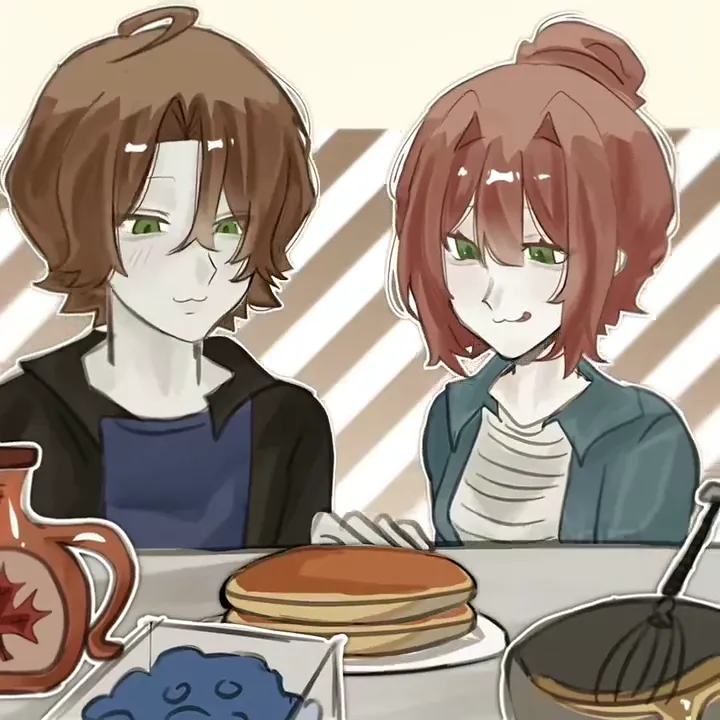
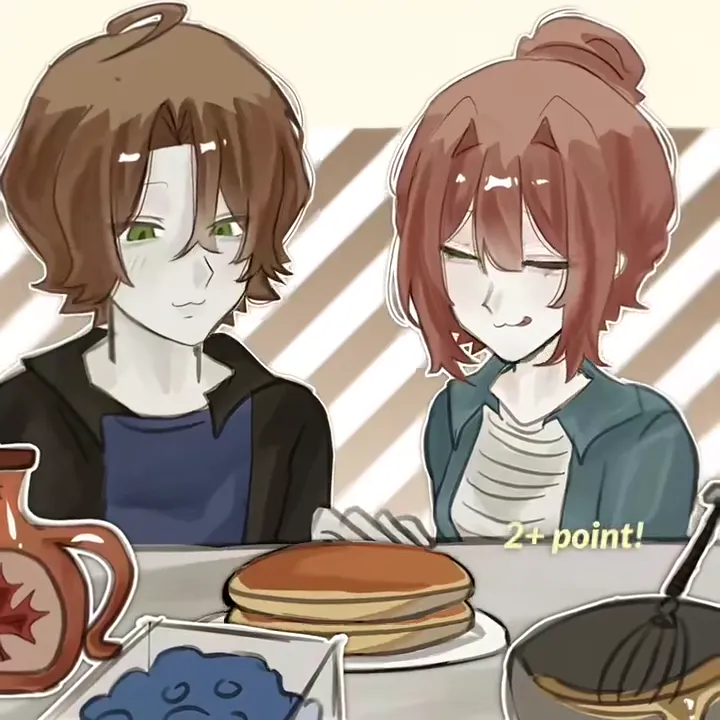
Two drawn characters watching a tall stack of pancakes at a striped breakfast table.

It is a joke in three parts, and the clip holds all three inside its first 15 seconds. The table comes first, pancakes piling onto the plate with syrup, blueberries and a whisk within reach, the stack still climbing when the shot changes. Then the kitchen: the oven goes up in flames, a spatula is held up and the panic is drawn one face at a time. Then the close-up on the character on the right as the POP lettering lands, a cut back to the table with a fresh stack, and the packaging box popping open, which is where the short cut ends. A recast does not re-time any of that: the two people from the photos take over the pair that already performs it.

The name comes from the hook, not from a character: people call the whole clip after the ‘pop pop’ they hear. The song is ILLIT’s ‘Pop’ from the EP released on 26 October, while the animation is a separate fan cartoon the group did not post, so a search for the ILLIT Pop animation and a search for the pancake cartoon land on the same clip. What gets traded between versions is the shape of the joke rather than one fixed art style, which is why every redraw has a different pair, and why two photos are enough for the next one.

How the pancake animation spread in November 2026

  1. The original drawn animation goes up on TikTok from @alinaluvsillit, past 769,000 likes.

  2. @an.pepper redraws the same scene with a Hunter x Hunter pair, crediting the original idea; around 208,000 likes.

  3. @jjing_bbang posts a Roblox version of the two characters, around 135,600 likes. Its version is where this page’s clip comes from: 720 × 720 at 30fps, with the breakfast act at the front and the Q-version dance after it.

  4. The two-photo tutorials start on 18 November: @iris53769 posts the walkthrough at about 225 likes and 60 shares, then @mia468865 and @octaviaolive0 post the same phone-screen version at 1,346 and 294 plays. Each one shows where the two photos go inside a template, not a separate result of its own.

Dates, accounts and like counts are from the TikTok posts, read on 20 November 2026.

Which cut fits: the pancake scene, or the dance too?

Both cuts take the same two photos and open on the same table; the length you pick only changes where the clip stops.

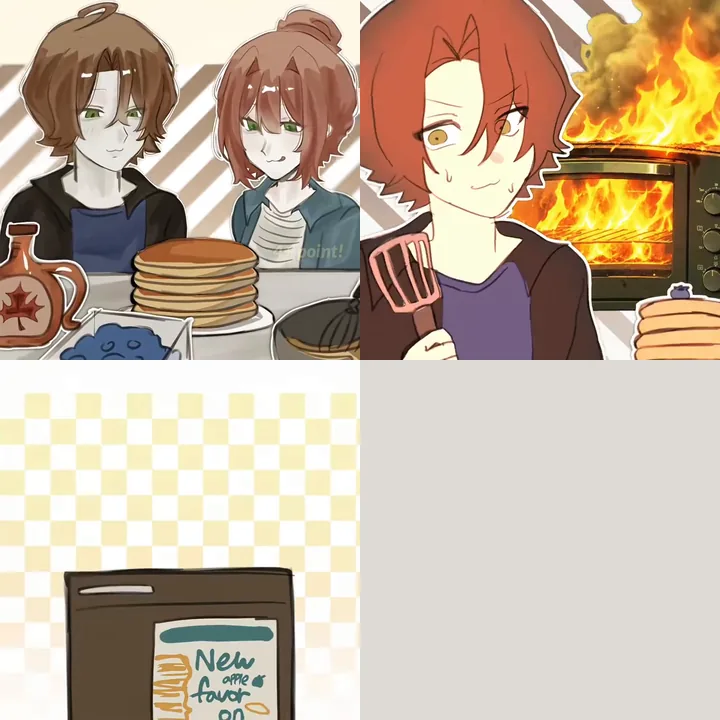
Four frames of the short cut in a grid: the drawn pair at the pancake stack, the kitchen fire, the packaging box, and one blank cell where the dance would be.

Short cut · 15s

The cut that ends at the packaging box

15 seconds and the whole pancake joke: the stack climbing at the table, the cut to the flaming oven, the POP close-up, then the packaging box popping open. This is the default, so the workbench opens on it, and it is the cheaper run.
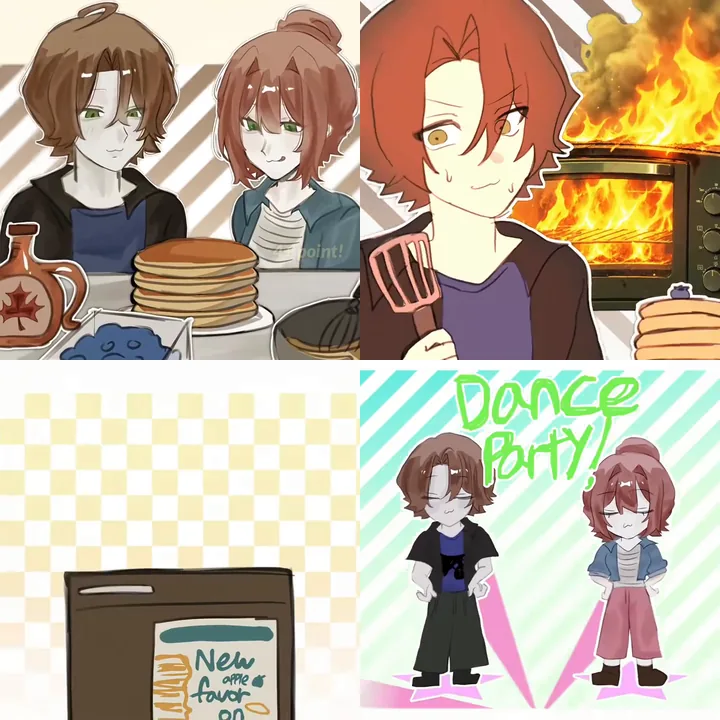
Four frames of the full take in a grid: the drawn pair at the pancake stack, the kitchen fire, the packaging box, and the Q-version pair dancing under Dance Party lettering.

Full take · 30s

The take that carries on into the Dance Party

Everything the short cut covers, then the Dance Party segment: the Q-version pair on striped backdrops, dancing after the box pops open. The price follows the length, so this take bills 1128 credits at 720p where the 15-second cut bills 564.

Pancake stacks, kitchen chaos and the Pop beat

Both cuts open on the same square flat 2D animation, and its title card is already gone. These four frames are what your two photos are carried onto, in this order.

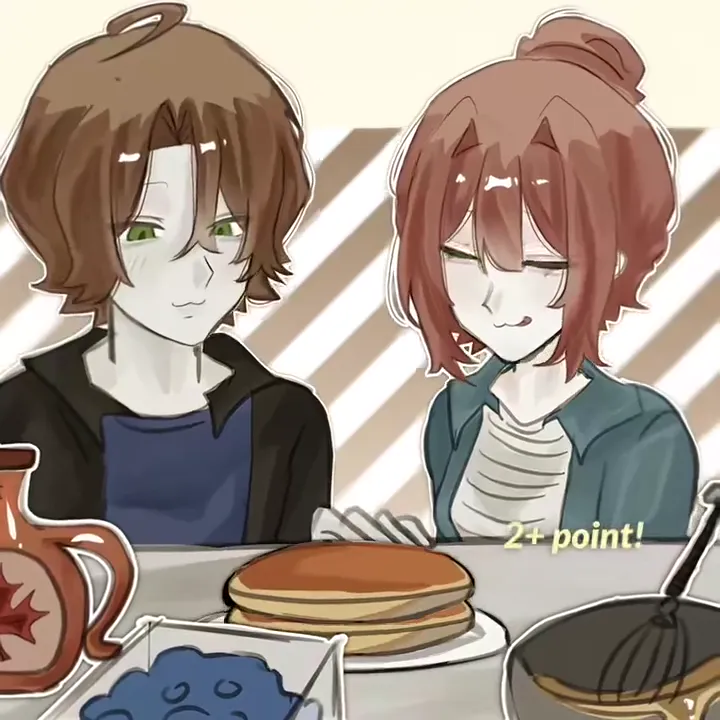
  • The clip's two flat 2D characters, brown hair on the left and a topknot on the right, at a table with a plate of pancakes, a syrup jug and blueberries.
    0.5s in

    Two at the table

    Both photos already carried onto the drawn pair at the striped backdrop: the two side by side, one stack on the plate, a syrup jug and a whisk within reach.

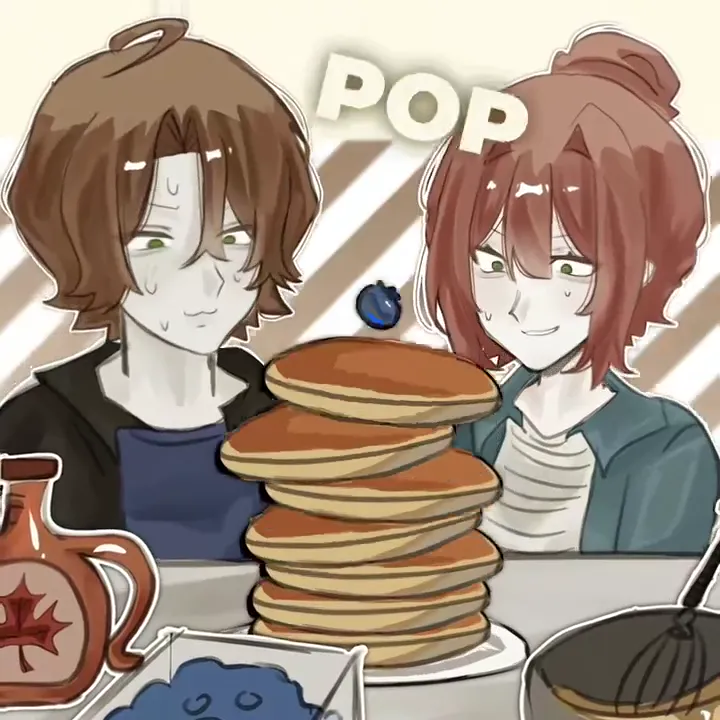
  • A tall stack of pancakes between the two characters, POP lettering above it and a blueberry on top.
    3.2s in

    The stack keeps climbing

    The plate becomes a tower, a blueberry rolls onto the top and POP lettering fills the space above: the frame worth screenshotting for a cover.

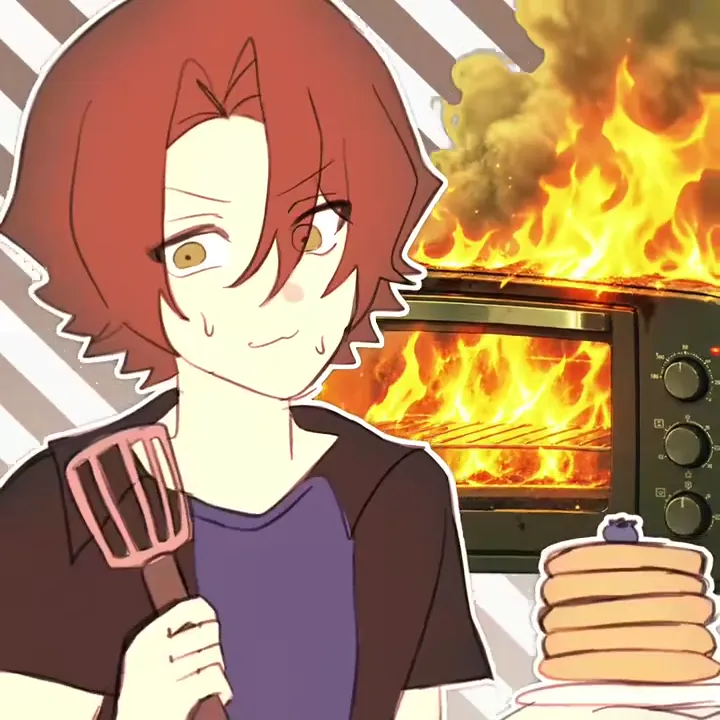
  • Close-up of the red-haired character holding a spatula in front of an oven full of flames.
    4.4s in

    The oven gives up

    A cut to the kitchen with a spatula up and flames behind: the close-up is where a friend’s face is easiest to recognise, and where the two slots are easiest to mix up.

  • The two characters back at the table with a fresh stack of pancakes, a syrup jug and a pan of batter.
    8.2s in

    Back to breakfast

    The table again, calm, with a fresh stack in front: the ending that gives a caption something to land on.

How do you make a Pop Pop two-photo animation?

Two photos go in, one finished clip comes out with your pair inside the cartoon, and nothing has to be drawn or cut by hand. The roles follow the frame rather than the photos: photo 1 takes the left character, photo 2 the right one, and swapping the two photos swaps what they play.

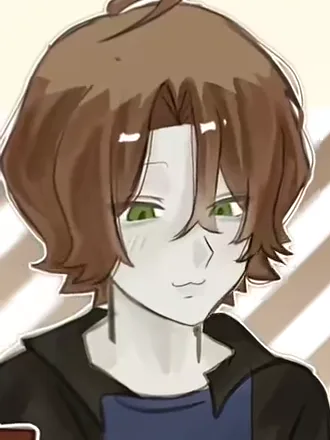
  1. Chest-up drawing of a character with brown mid-length hair and a dark jacket over a navy tee.

    Photo 1Left brown hair

    Plays the character on the left: your face and hair carried onto the drawn body at the table, the dark open jacket over a navy tee, the calmer one of the two.

    • Hair colour and length are the lines that travel from a photo onto a drawing, so mid-length or longer hair reads best in this slot.
    • A chest-up crop keeps the face large enough to carry; the jacket and the tee stay the clip’s, and the drawing keeps its own.
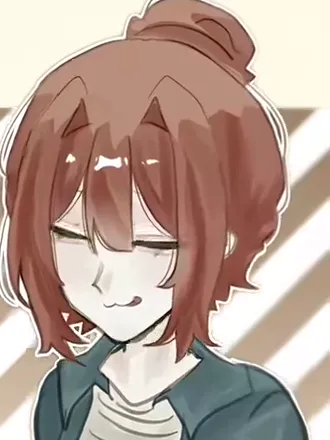
  2. Chest-up drawing of a character with red-brown hair in a topknot and a blue-grey jacket over a striped shirt.

    Photo 2Right topknot

    Plays the character on the right: your face and hair on the one who wears the topknot and the blue-grey jacket, and the character alone on screen in the kitchen beat.

    • Tied-back or bun hair in the photo is the cue for this slot; long loose hair works too, but the front hairline carries more of the likeness.
    • Face the camera: this character is alone in the close-up, where the drawing has the least room to correct a turned head.

Photo checklist

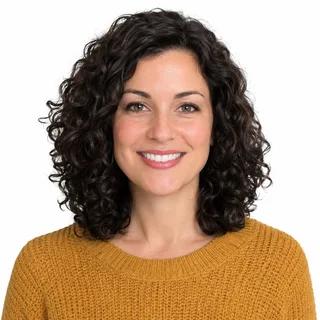
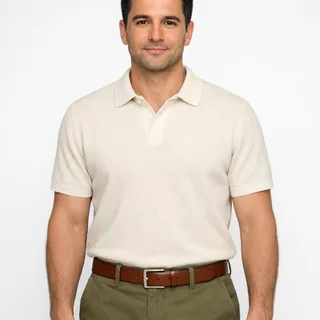
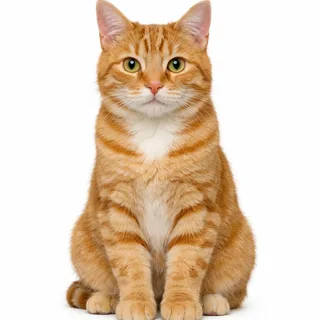
Works well

  • A curly-haired woman in a mustard sweater, chest up, smiling at the camera.Face clear and evenly lit
  • A man in a cream polo shirt photographed from the head to the waist.One person or pet in the photo
  • A ginger tabby cat sitting upright and facing the camera.A pet in either slot

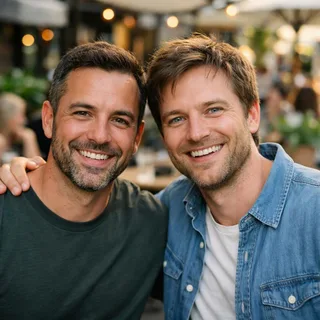
Avoid

  • Two men side by side in one photo at a cafe.Two people in one photo
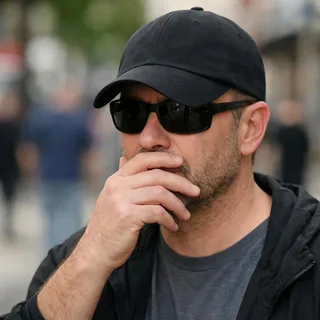
  • A man in sunglasses and a low cap with a hand over his mouth.A hand, cap or sunglasses over the face
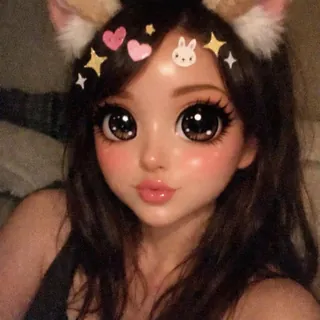
  • A selfie under a cartoon filter with cat ears, huge eyes and stickers.A filter or beauty mode already editing the face

From two photos to the pancake scene

  1. Upload two photos

    Add two photos, one per slot, so each slot gets a single face or a single pet.

  2. Pick the cut and the resolution

    Choose the 15-second short cut or the 30-second full take, then 720p or 1080p, then click Generate. The square frame and the sound come from the clip, and the button shows the exact credit price first.

  3. Download and post

    Download the MP4 and post it. If the result is close but not quite, a second run with clearer chest-up photos is the fastest fix.

Pop Pop animation and the CapCut template

Most tutorials point at a CapCut template built on 12 November. That is a different product doing a different job: it leaves two framed photo slots and cuts them to the music, while this page sends the clip through a video edit model and returns one video. Its detail page reads 8,470 uses and 56,736 plays on 20 November, and those are uses of a placeholder template, not photo recasts. Pick by the result you want.

Take this page if you want your pair inside the drawing

  1. Your two photos as the cast

    Both photos come back as the pancake pair; the clip supplies the beats, the striped staging and the flat line, so the two are drawn the way the animation already is.

  2. One file, no timeline

    One generation returns the whole scene; there is no second photo layer to place, key or time against the beat.

  3. The pancake scene on its own

    The short cut ends at the packaging box after the POP; the Q-version Dance Party follows only in the full take.

Take the placeholder edit if you want your own photos in frame

  1. The placeholder edit

    The CapCut entry keeps two framed photos and cuts them to the music: 34.6 seconds, 4:3, twelve segments, and nothing in it redraws a face, so the look stays photographic.

  2. Works in the browser, no region lock

    The CapCut detail page answers that the template is not available to every visitor, so check it before you count on that route; this page generates in the browser instead.

  3. The photos to stay photos

    Both photos stay photographs there: nothing in that edit draws them, so the result is a photo next to a drawing rather than a pair that lives in the scene.

Do you need a Pop Pop animation AI prompt?

Not here: two photos and one setting are the whole input, because the clip and its instruction are already wired into the template. If you would rather run the same edit in a tool of your own, paste this text with the clip as the video reference and the two photos in order as photo 1 and photo 2.

Any video edit tool

Prompt length 1178

Use the reference clip as the scene, and photo 1 and photo 2 as the two people to put inside it.

Replace both drawn characters in the reference clip: the one on the left at the breakfast table, with the brown mid-length hair and the dark open jacket over a navy tee, becomes the person in photo 1; the one on the right, with the red-brown hair in a topknot, the blue-grey jacket and the striped shirt, becomes the person in photo 2. Carry each person's face, hair colour and length, glasses and skin tone onto that character, and keep the drawn body, its clothes and its place in the frame.

Follow the clip beat for beat: the pair at the plate while the pancakes stack higher, the cut to the kitchen with the spatula up and the oven in flames, the close-up on the right-hand character, then the return to the table with a fresh stack and the POP. Keep the reference clip's square frame, its camera height, its cuts, its pacing and its own sound. Neither drawn character may remain beside the two, and nobody from the photos appears twice. No photoreal faces inside the drawn scene, no new people, props or dialogue, and no extra lettering beyond the POP that is already there.

What keeps the clip intact

  • Point at what is visible

    Hair colour and length, glasses, skin tone: those are the lines that survive onto a drawn face, and they are what keeps the two apart across the cuts.

  • Protect the cut

    Ask for the clip’s camera height, its beats and its own sound. An edit model left alone will re-time the sequence and re-cut the scene around the new faces.

  • Keep the bodies drawn

    The pair is a drawing: say so, or the faces can come back photographic on top of a flat body.

What breaks it

  • Leaving the cast to the model

    A request that only says “make us into the animation” can leave the original pair standing next to two new faces.

  • Asking for lettering

    The POP word is already in the clip; a requested caption usually arrives as broken letters, and asking for a redraw of the frame invites more of them.

  • Stacking quality words

    “Cinematic, hyper-detailed, 8K” pulls the faces toward a photograph and away from the flat line the clip is drawn in.

A request with no cast and no order, and one with both

The one-line ask

Make me and my friend into the Pop Pop pancake animation.

The instruction

Use the reference clip as the scene, replace the left brown-haired character with photo 1 and the right topknot with photo 2, keep the drawn bodies, the square frame, the cuts and the clip’s own sound, and keep either face off the wrong character.

The first hands the cast, the style and the timing to the model. The second says which photo lands on which character and what must not change.

Cooking animation Pop: inputs, output and credits

Cooking animation Pop: inputs, output and credits
Photos
2 photos
Photo files
PNG / JPG / WebP, up to 10 MB, at least 512 px on the short side
Length
Short cut 15 seconds, full take 30 seconds; the cuts inside either one are the clip’s own
Resolution
720p or 1080p; 720p by default, and the only setting the page opens.
Sound
The clip keeps its own sound: it is not regenerated, and there is no track to pick.
Credits
The default 15-second run is 564 credits at 720p, 846 at 1080p. The 30-second take is 1128 at 720p, 1692 at 1080p.
Visibility
Videos made on a free account are public. On a paid plan they are private by default.
If a run fails
The credits go back to your balance automatically

Where the two-photo recast goes wrong

Three things go wrong most often once two photos are inside a drawn clip, and each one has a change worth trying before another run.

  • The faces come back photographic

    Why
    A recast carries the look of a photo, so a sharp, evenly lit selfie can land on the drawn body as a real face inside a flat frame.
    Fix
    The paste-ready prompt above spells out that the pair stays drawn; a rerun from a softer, less sharpened photo is the other lever.
  • The two roles come back swapped

    Why
    The slots are fixed to the frame, left and right, and similar hair on both photos gives the model nothing to tell them apart when the close-up isolates one.
    Fix
    Two photos with clearly different hair colour and length, with photo 1 kept as the left character; a swap is a rerun, not something to re-edit afterwards.
  • The drawn pair survives beside your photos

    Why
    Neither character from the clip may remain. In the wide table shots an edit model tends to keep the brown-haired original standing next to the two it has just made.
    Fix
    Photos whose hair differs from both drawn characters make the swap read; if the original still turns up in the wide shot, a rerun from those two photos is the fix.

FAQ

Pop Pop animation with two photos: FAQ

Can I use only one photo?+

Both slots are required. The same photo can go in both, but the clip does not become a one-character animation: the second slot still puts that face on the other drawn character, and the two are then easy to confuse.

Why do the two faces get mixed up?+

The clip cuts from a two-shot to a close-up of one character, and a drawn face has few lines to tell two people apart. Two photos with clearly different hair, taken chest up, are what stops the pair trading places.

Does it include the Dance Party part?+

The full take does: after the packaging box pops open, the Q-version pair dance on striped backdrops. The 15-second cut, the default, stops at the box, so pick the full take when the dance is the part you came for.

Which song is the animation known for?+

The clip is built on ILLIT’s ‘Pop’, and ‘Pop Pop’ is the hook people hear. The animation itself comes from a separate fan account, not from the group.

Was the original animation made with AI?+

Nothing suggests it: the original and the character redraws are hand-drawn fan animations. Putting two photos on the drawn pair is the later step, and it is what this page does.

Is this the CapCut template?+

No. A CapCut template uses the same scene and is not affiliated with this page: it cuts two framed placeholder photos to the music. This page sends the clip through a video edit model and returns one video with your pair inside it.

Is this the official ILLIT or Roblox animation?+

No. The pancake animation is a fan cartoon, and Oeneo AI is not affiliated with ILLIT, Roblox or CapCut; the names here are how people find the meme.

Is it free?+

No, each run costs credits. The price follows the resolution you pick, and the Generate button shows the exact amount before anything starts. New accounts start with 10 credits.

What sound does the video have?+

It keeps the sound that is already inside the clip, and nothing is regenerated or laid over it. The page does not promise a particular song or a clean copy of one, so listen to the download before you publish if the audio matters for the post.

Can I change the length or the frame?+

Two lengths ship, 15 seconds and 30 seconds. The 1:1 frame and every cut inside either one come from the clip, so the POP lands where it always does. Resolution is the only setting the page opens: 720p or 1080p.

Can a pet play one of the two?+

Yes, a pet goes in either slot and its face, ears and fur are carried onto that drawn character, which keeps its own body and clothes. What is not guaranteed is the cooking: the clip has hands on a spatula and a whisk, so expect a pet character with human-like hands, or keep two people if that detail matters.

Can I make it with a friend?+

That is the intended use: two photos, two characters, one clip. Each slot takes one person or one pet, and each photo lands on its own drawn character.

Why doesn’t the character look like me?+

A drawn face keeps a handful of lines, so hair colour and length, glasses and skin tone carry the identity while the exact features do not. The photo checklist above is the fix: chest up, facing the camera, even light.

Make your Pop Pop animation video

Two photos and one square take: your pair inside the climbing stack, the kitchen fire and the POP, in the 15-second cut or the 30-second full take.