
FLUX.2 Klein

Use Black Forest Labs' fast FLUX.2 Klein 4B and 9B in your browser, with no GPU and nothing to download. Draft from a prompt or edit your own photos on Oeneo AI, and see the credit cost before every run.

  • 4B and 9B in one picker
  • Up to 4 reference photos
  • 1-credit 4B drafts

Reference images (Optional)

0/4
0/5000

Model

Aspect ratio

Number of images

Resolution

Output format

Draft, combine, restore, restyle: four jobs for FLUX.2 Klein

Klein generates and edits in one model. With no photo attached it works from your prompt alone; attach 1 to 4 photos and the same prompt box edits them instead.

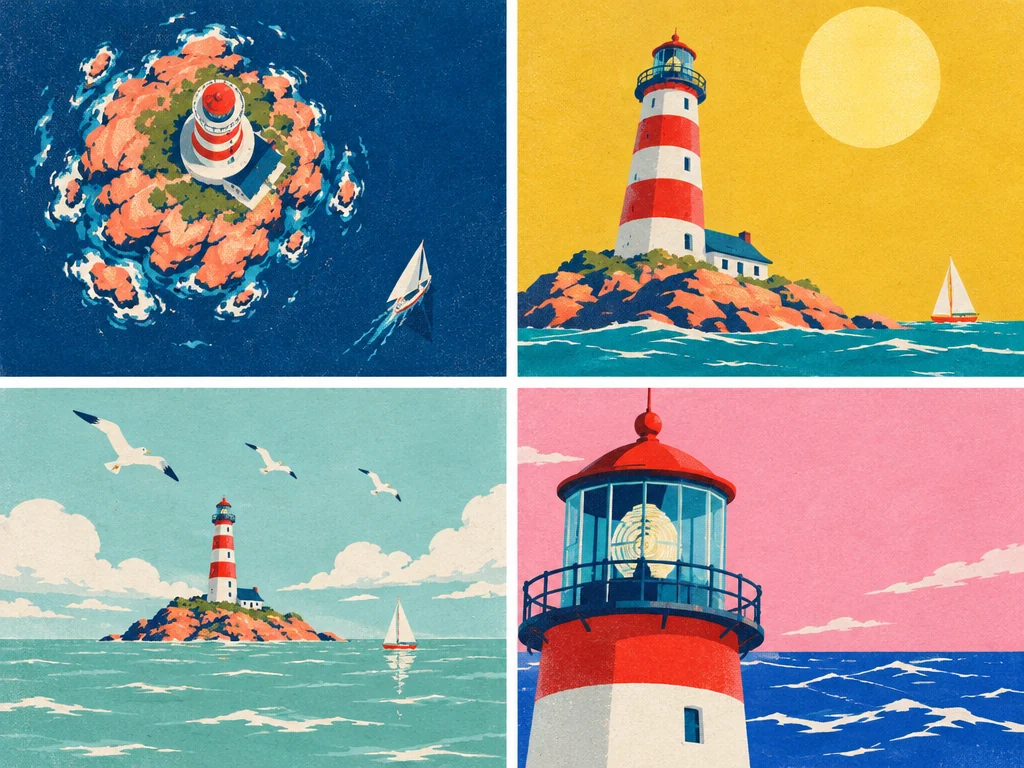
Four flat screen-print travel poster drafts of the same striped lighthouse, each with a different viewpoint and color scheme

Text to image

Draft 4 directions from one prompt

Set the image count to the maximum and one run returns several takes on the same brief, so you can compare layout, viewpoint and color before you commit. Keep the strongest one and attach it as a reference to refine it.
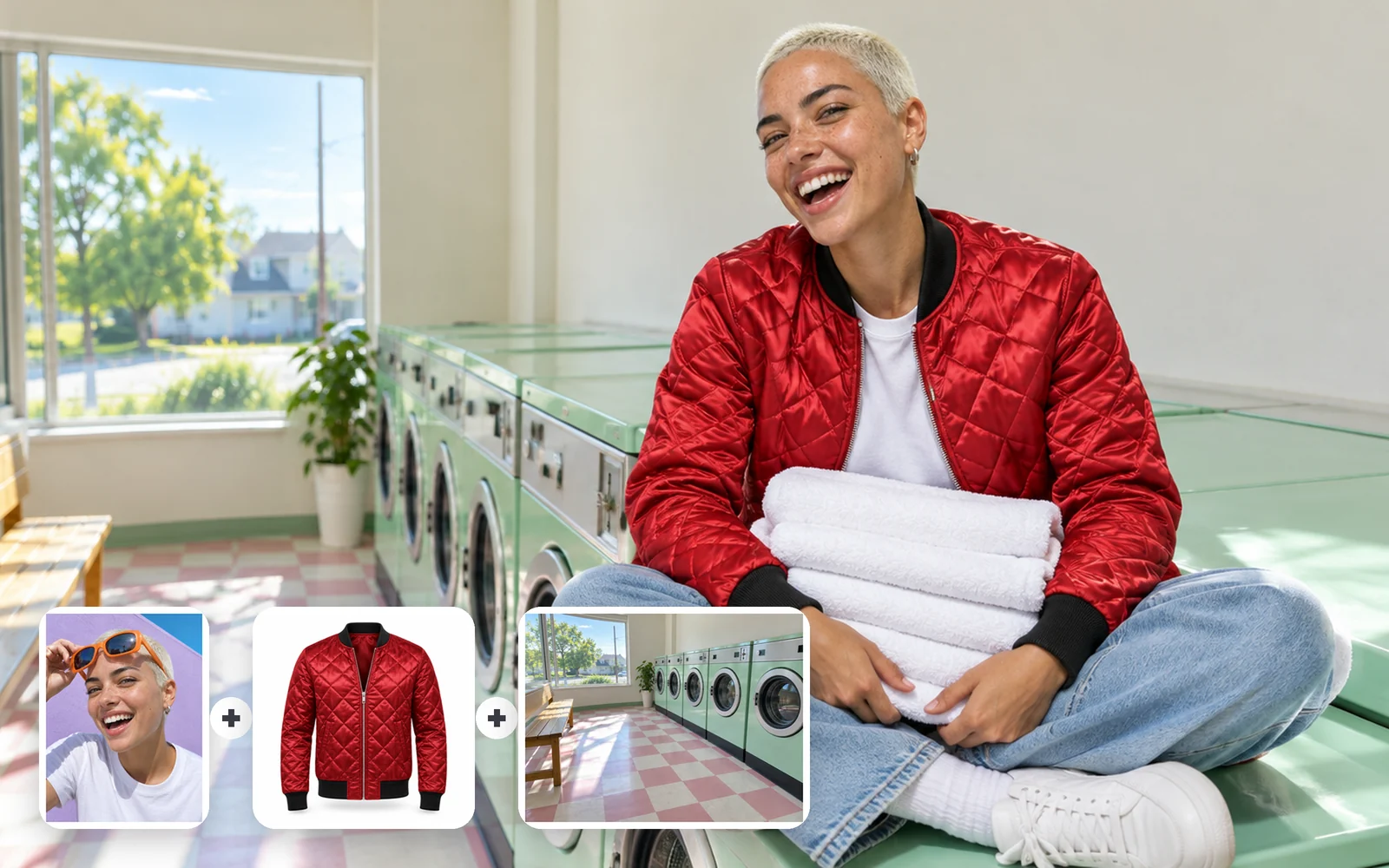
A woman with a platinum buzz cut in a cherry-red quilted bomber laughing on a mint washing machine in a sunny laundromat; corner cards show her portrait, the jacket and the empty laundromat

Multi-reference edit

Combine up to 4 reference photos in one image

Use it to dress a person in a new outfit, place them somewhere new, or keep one character across several scenes by reusing the same portrait. Check faces and garment details against the originals, since similar items can swap features.

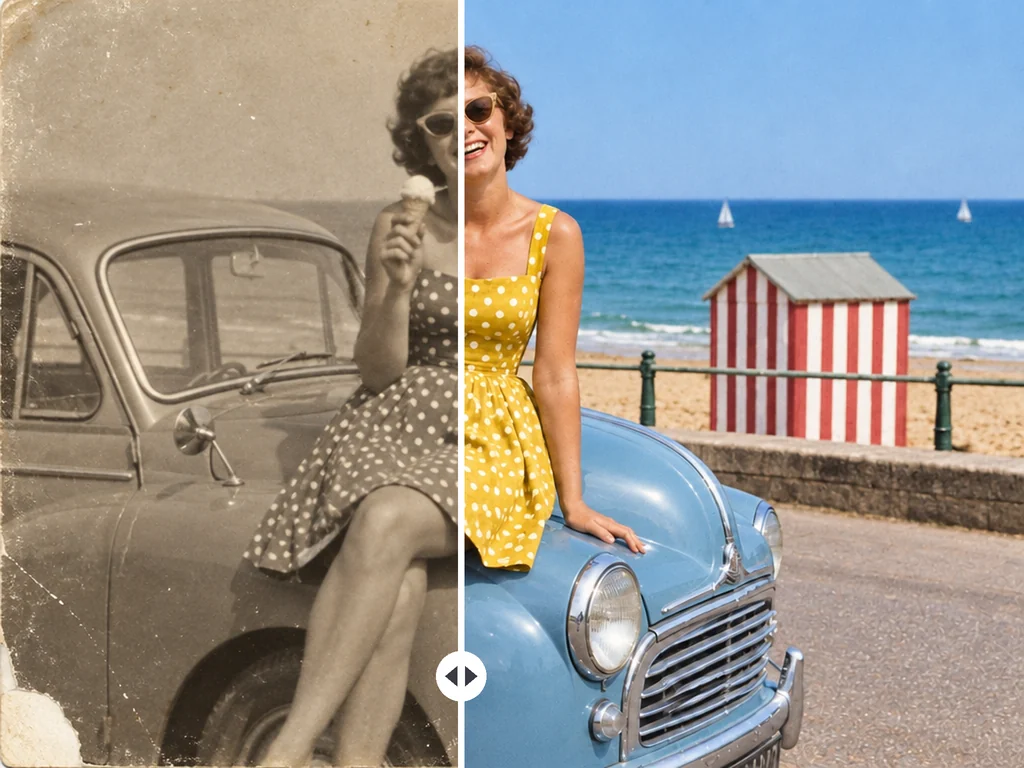
Split view of a 1960s seaside snapshot of a woman with an ice cream sitting on a vintage car: the left half creased and sepia, the right half cleaned up and in color

Single-photo edit

Restore and colorize a worn photo

Upload one scan, name the damage to remove and the colors you expect, and say what must stay the same. Generative restoration can alter faces and small details, so compare the result with the original before you print or share it.

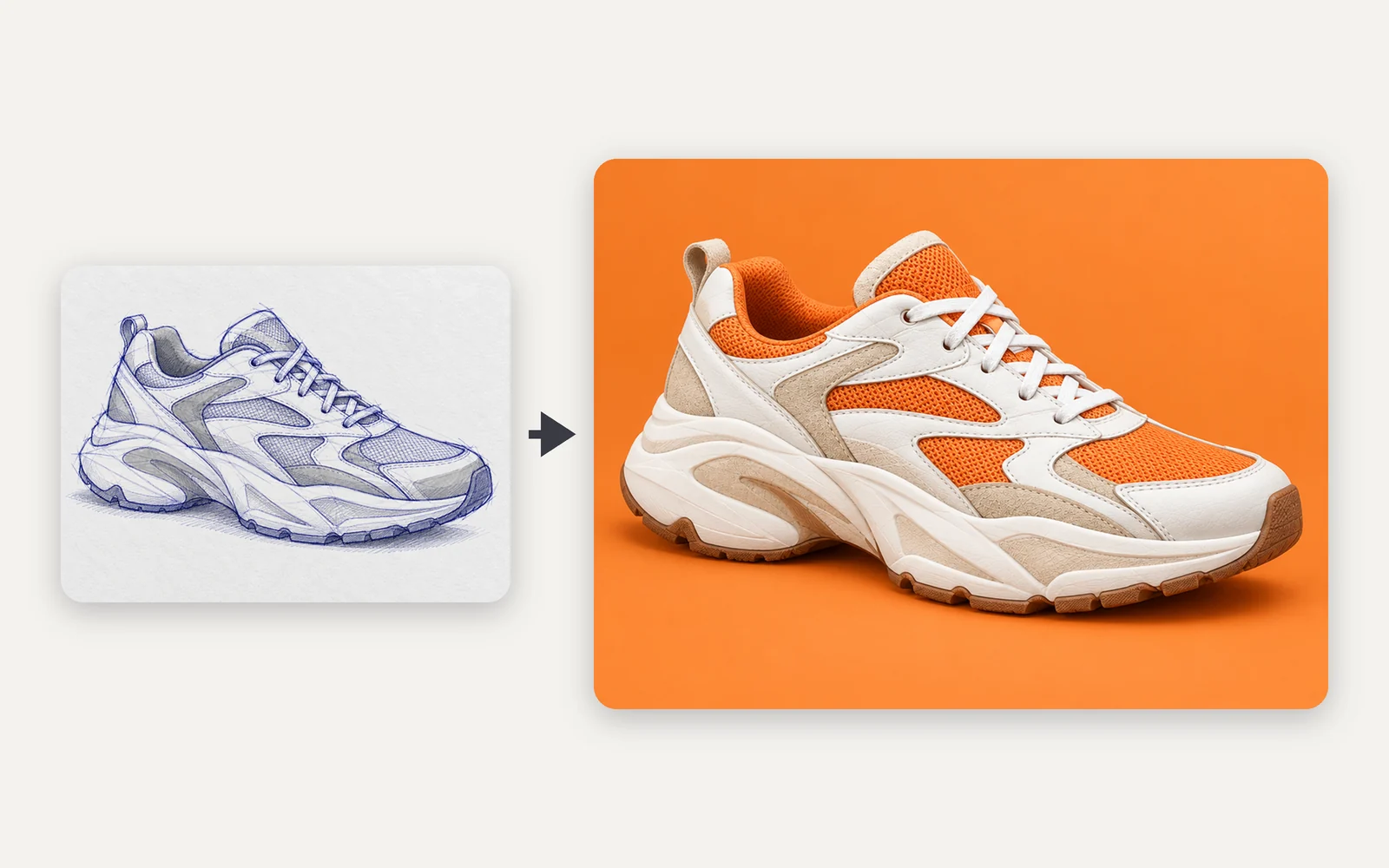
A blue ballpoint concept sketch of a chunky running sneaker next to a photo of the same shoe in cream suede and orange mesh

Style to photo

Turn a sketch into a photo

A rough sketch, an anime frame or a game screenshot sets the shape and angle; your prompt sets the materials, light and backdrop. Use artwork you made or have rights to, and expect fine lines and any lettering to change.

When is Klein 9B worth more credits than 4B?

Both sizes take the same prompts, photos and settings here. 4B is the cheapest way to explore. BFL positions 9B as its higher-quality small model, and its edit price rises with each photo you attach. FLUX.2 Pro is the full-size step up. Credits are per image, and the generator shows the exact quote before you run.

CompareFLUX.2 Klein 4BFLUX.2 Klein 9BFLUX.2 Pro
BFL positioningSmallest, fastest KleinFlagship small modelFull-size FLUX.2 model
Pick it forCheap batches of draftsEdits that hold detailPhotoreal finals
Text to image, 1K / 2K1 / 4 credits2 / 5 credits6 / 9 credits
Edit with 1 photo, 1K / 2K2 / 8 credits6 / 12 credits9 / 12 credits
Edit with 4 photos, 1K / 2K2 / 8 credits12 / 18 credits18 / 21 credits
Reference photosUp to 4Up to 4Up to 8
Images per run1 to 41 to 41
Open weightsApache 2.0FLUX Non-CommercialNone, API only
Use itSwitch to 4B aboveSelected aboveFLUX.2 Pro page

Klein takes your prompt literally: what to write, what to avoid

The words you type are everything Klein works from, so a short prompt gets a generic image. These habits matter most.

Spell out

  1. The subject first

    Words near the start carry the most weight. Open with the main subject and action, then add the setting, light and style.

  2. Which photo does what

    Call your uploads image 1 to image 4 and give each a single role, such as the person from image 1 in the jacket from image 2.

  3. What must stay

    For edits, list what to keep (face, pose, framing, colors) as well as what to change.

Avoid

  1. Negative phrasing

    FLUX.2 has no negative prompt, and writing "no people" can still bring in a crowd. Describe what you want instead, such as an empty street.

  2. Editing your last edit

    Every pass redraws the whole image, so color and detail drift with each round. Go back to the original and put all the changes in one prompt.

  3. Complex poses in one try

    Hands and tangled poses are a known weak spot. Simplify the pose, attach a photo that shows it, or generate 4 and keep the best.

Example edit prompt: The woman from image 1 wears the red quilted jacket from image 2 and sits on a washing machine in the laundromat from image 3. Keep her face, hair and earrings unchanged. Bright afternoon window light.

Klein 4B and 9B settings, limits and lowest price

Klein 4B and 9B settings, limits and lowest price
Model sizes
FLUX.2 Klein 4B and 9B (distilled), switchable in the model picker
Modes
Text to image; attach photos and the same run becomes an edit
Reference photos
0 to 4 per run
Images per run
1 to 4
Resolution
1K, 2K
Aspect ratios
1:1, 4:3, 3:4, 16:9, 9:16, 21:9, 9:21; when editing, Auto follows your first photo
Formats
PNG, JPEG, WEBP
Lowest price
1K text to image: 4B 1 credit, 9B 2 credits per image; edits and 2K cost more
Not available here
LoRAs, Base models, step and seed controls, masks, realtime mode

Is FLUX.2 Klein free, and where does it fall short?

What is FLUX.2 Klein?+

FLUX.2 Klein, written FLUX.2 [klein] by Black Forest Labs, is the small, fast branch of the FLUX.2 family, released on January 15, 2026. It comes in 4B and 9B sizes, and one model handles text-to-image, photo edits and composing from up to 4 reference images. Oeneo AI runs both distilled sizes online.

Can I use FLUX.2 Klein online without a GPU?+

Yes. Choose Klein 4B or 9B in the generator on this page and it runs in the cloud, with nothing to download or install. Running the weights yourself takes a capable graphics card; BFL's own table lists about 20 GB of VRAM for the 9B.

Is FLUX.2 Klein free?+

You can try it free: new accounts get 10 credits, enough for 10 Klein 4B images at 1K. After that every image costs credits, listed per size in the table above. Images made on the free plan are public, and paid plans can keep them private.

Can I use FLUX.2 Klein images commercially?+

The two sizes ship under different licenses: the 4B weights are Apache 2.0, while the 9B weights use the FLUX Non-Commercial License. Those licenses govern downloading and running the weights yourself. On Oeneo AI you use Klein through a hosted service, and what you may do with your images is set by our Terms of Service and your plan.

Is FLUX.2 Klein the same as FLUX.2 [dev]?+

No. FLUX.2 [dev] is a larger open-weights model released under a non-commercial license, and Oeneo AI does not offer it. Klein is BFL's smaller, faster line. For a full-size FLUX.2 model on this site, use FLUX.2 Pro.

Can I use LoRAs, the Base models or a mask with Klein here?+

No. Oeneo AI runs the distilled 4B and 9B with BFL's default settings, so there are no LoRAs, Base models, step or seed controls, or mask painting. To change one area, name it in the prompt and list what should stay.

Why did Klein change parts of my photo I wanted to keep?+

An edit redraws the whole image, so clothing, colors or even faces can shift. Name what must stay, edit from the original rather than a previous result, and compare the two side by side. In community comparisons, 9B usually holds detail better than 4B.

Why does Klein sometimes get hands or poses wrong?+

Complex poses and hands are a known weak spot, and people running Klein locally report extra fingers and twisted limbs in prompt-only images. Attaching a photo that shows the pose works better than describing it. For a finished portrait, FLUX 3 Image may suit better.

Can FLUX.2 Klein put text in an image?+

Short words can work, but BFL's model card warns that text may come out inaccurate or distorted, so check every letter. For posters, menus or anything text-heavy, use a model built for typography.

FLUX.2 Klein or Z-Image Turbo: which fits my task?+

Choose Klein when you need to edit or combine photos or want 2K output. On Oeneo AI, Z-Image Turbo makes 1K images from a prompt only. For quick text-only drafts both are low-cost, so try the same prompt on each and compare the look.

Start with 9B, switch to 4B for batches

The generator above opens on Klein 9B. Attach photos to edit them, or switch to 4B when you want many low-cost drafts. The credit quote updates before every run.